Automation 2040 W (Pico W Aboard) [Discontinued]
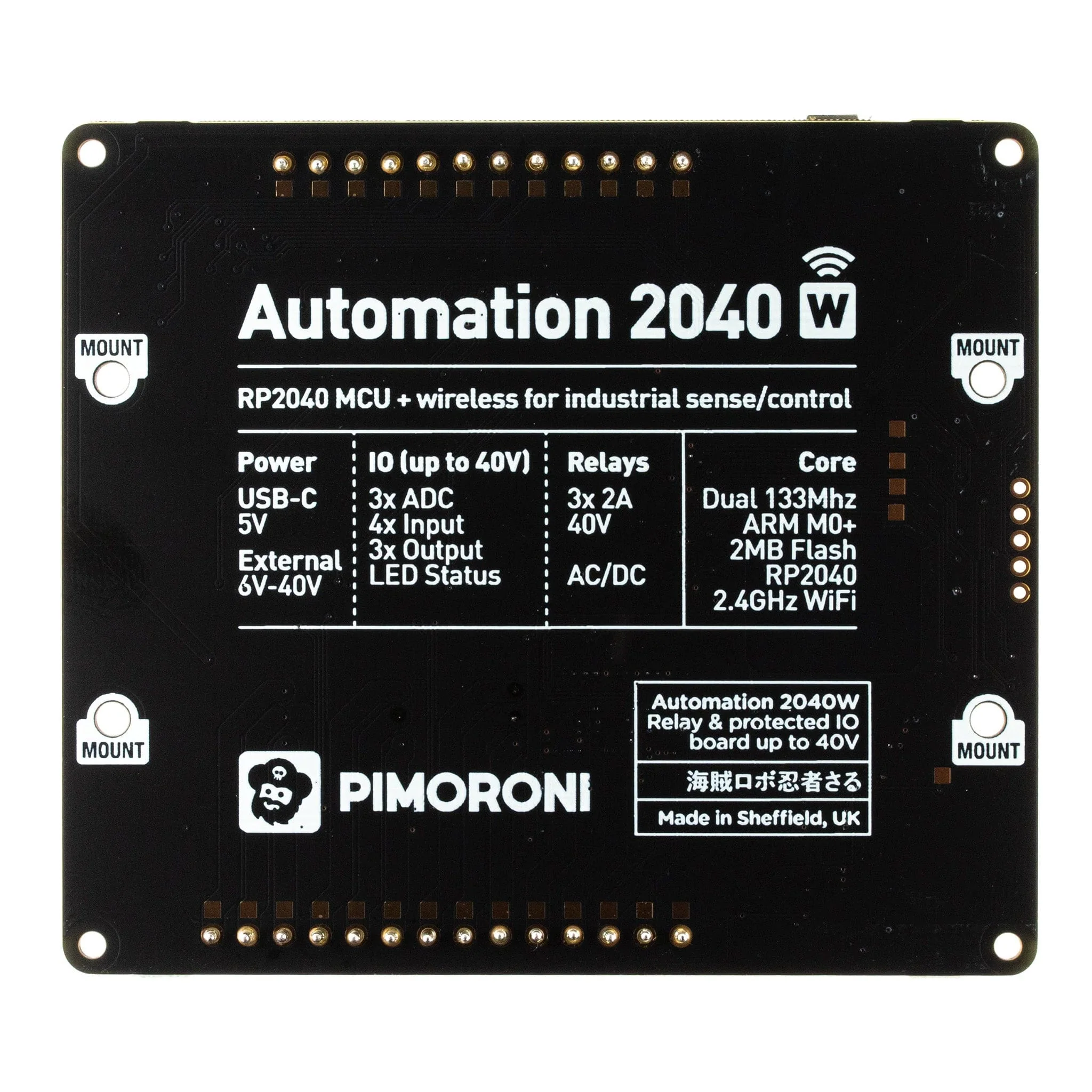
An all-in-one, Pico W powered industrial/automation controller with 2.4GHz wireless connectivity, relays and a plethora of inputs and outputs. Compatible with 6V to 40V systems. Raspberry Pi Pico W built-in!
Automation 2040 W is a Pico W / RP2040 powered monitoring and automation board. It contains all the great features from our Automation HAT (relays, analog channels, powered outputs and buffered inputs) but now in a single compact board and with an extended voltage range so you can use it with more devices. Great for controlling fans, pumps, solenoids, chunky motors, electronic locks or static LED lighting (up to 40V).
All the channels (and the buttons) have an associated indicator LED so you can see at a glance what's happening with your setup, or test your programs without having hardware connected. We've even left some space for labelling whatever you've got connected up, be it piranha fish tanks, smart greenhouse sprinklers, elaborate homebrewing projects or Thunderbirds-esque garage door openers.
Want to mount this board inside a switch cabinet or other electrical enclosure? We have DIN rail mounting clips coming soon!
Features
- Raspberry Pi Pico W Aboard
- Dual Arm Cortex M0+ running at up to 133Mhz with 264kB of SRAM
- 2MB of QSPI flash supporting XiP
- Powered and programmable by USB micro-B
- 2.4GHz wireless
- 3 x 12-bit ADC inputs up to 40V
- 5 x digital inputs up to 40V
- 3 x digital sourcing outputs at V+ (supply voltage)
- 4A max continuous current
- 2A max current at 500Hz PWM
- 3 x relays (NC and NO terminals)
- 2A up to 24V
- 1A up to 40V
- 3.5mm screw terminals for connecting inputs, outputs and external power
- 2 x tactile buttons with LED indicators
- Reset button
- 2 x Qw/ST (Qwiic/STEMMA QT) connectors for attaching breakouts
- M2.5 mounting holes
- Fully assembled
- No soldering required.
- C/C++ and MicroPython libraries
- Schematic (coming soon)
Power
- Board is compatible with 12V, 24V and 36V systems
- Requires supply 6-40V
- Can provide 5V up to 0.5A for lower voltage applications
Software
Our C++/MicroPython libraries provide a straightforward way to interface with the functions on this board. You'll get the best performance using C++, but if you're a beginner we'd recommend using our batteries included MicroPython build for ease of getting started.
- Download pirate-brand MicroPython
- Getting Started with Raspberry Pi Pico
- MicroPython examples
- MicroPython function reference
- C++ examples
- C++ function reference
- Getting Started with Automation 2040 W
Connecting Breakouts
The Qw/ST connectors on Automation 2040 W make it super easy to connect up I2C Qwiic or STEMMA QT breakouts. If your breakout has a QW/ST connector on board, you can plug it straight in with a JST-SH to JST-SH cable.
Breakout Garden breakouts that don't have a Qw/ST connector can be connected using a JST-SH to JST-SH cable plus a Qw/ST to Breakout Garden adaptor. Want to use multiple breakouts at the same time? Try this adaptor!
- List of breakouts currently compatible with our C++/MicroPython build.
Notes
- Do not use to switch mains voltages!
About Pico W Aboard
Our new Pico W Aboard products come with a built-in Raspberry Pi Pico W. This means you get all the advantages of an RP2040 microcontroller - a speedy fast dual-core ARM processor, a dynamic, growing ecosystem and a choice of different programming methods to experiment with. Most excitingly though, Pico W has wireless connectivity, so your Pico/RP2040 devices can communicate with each other, and the internet!
Wireless is very new to Pico/RP2040 - be aware that things will move fast and change! Software support (wireless examples, tutorials, CircuitPython support etc) will take a little while to catch up. If you're an absolute beginner to Pico/RP2040, you might have a better experience with wireless if you wait until everything is a little more settled.
Product Information
Product Information
Shipping & Returns
Shipping & Returns
Automation 2040 W (Pico W Aboard) [Discontinued]
Automation 2040 W (Pico W Aboard) [Discontinued]
An all-in-one, Pico W powered industrial/automation controller with 2.4GHz wireless connectivity, relays and a plethora of inputs and outputs. Compatible with 6V to 40V systems. Raspberry Pi Pico W built-in!
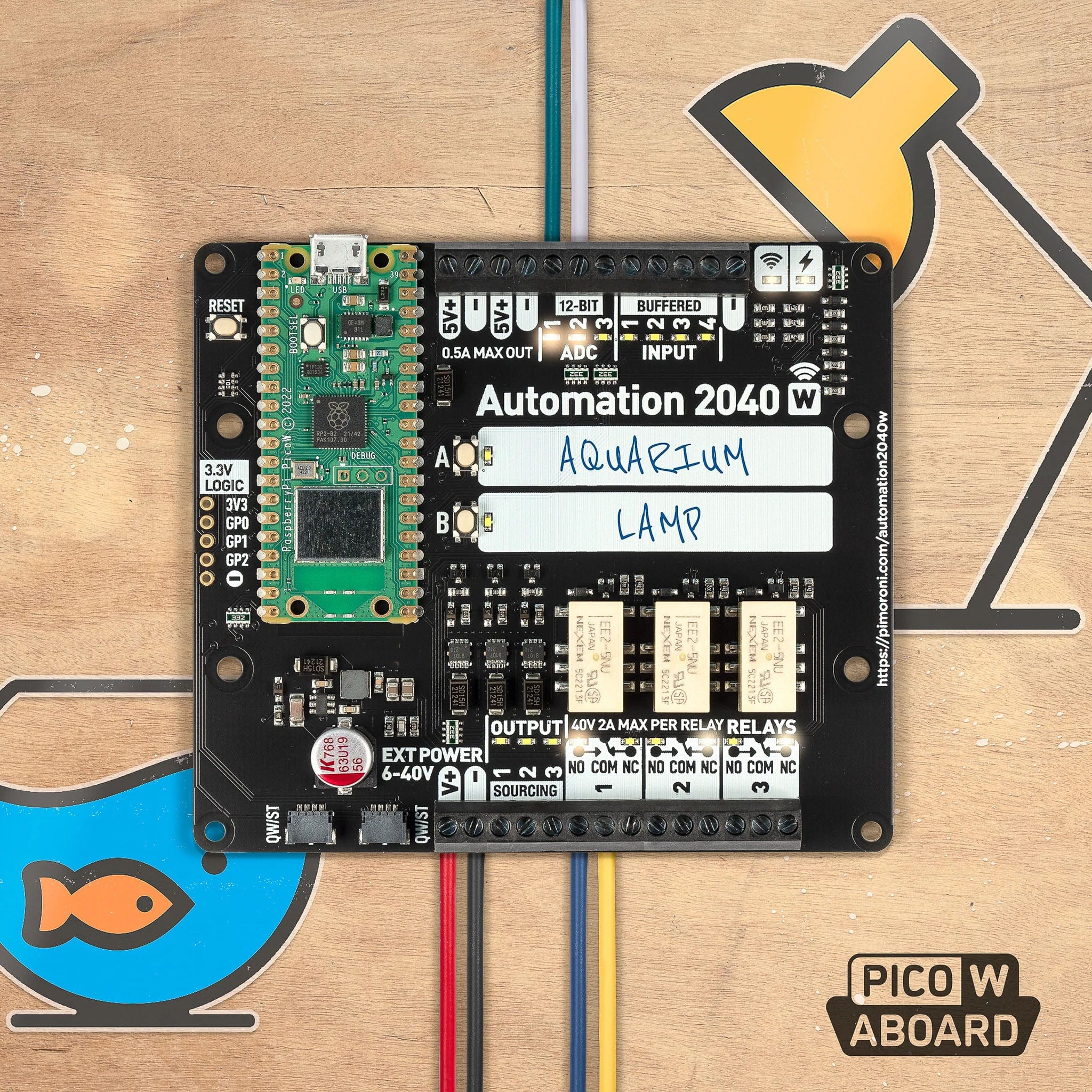
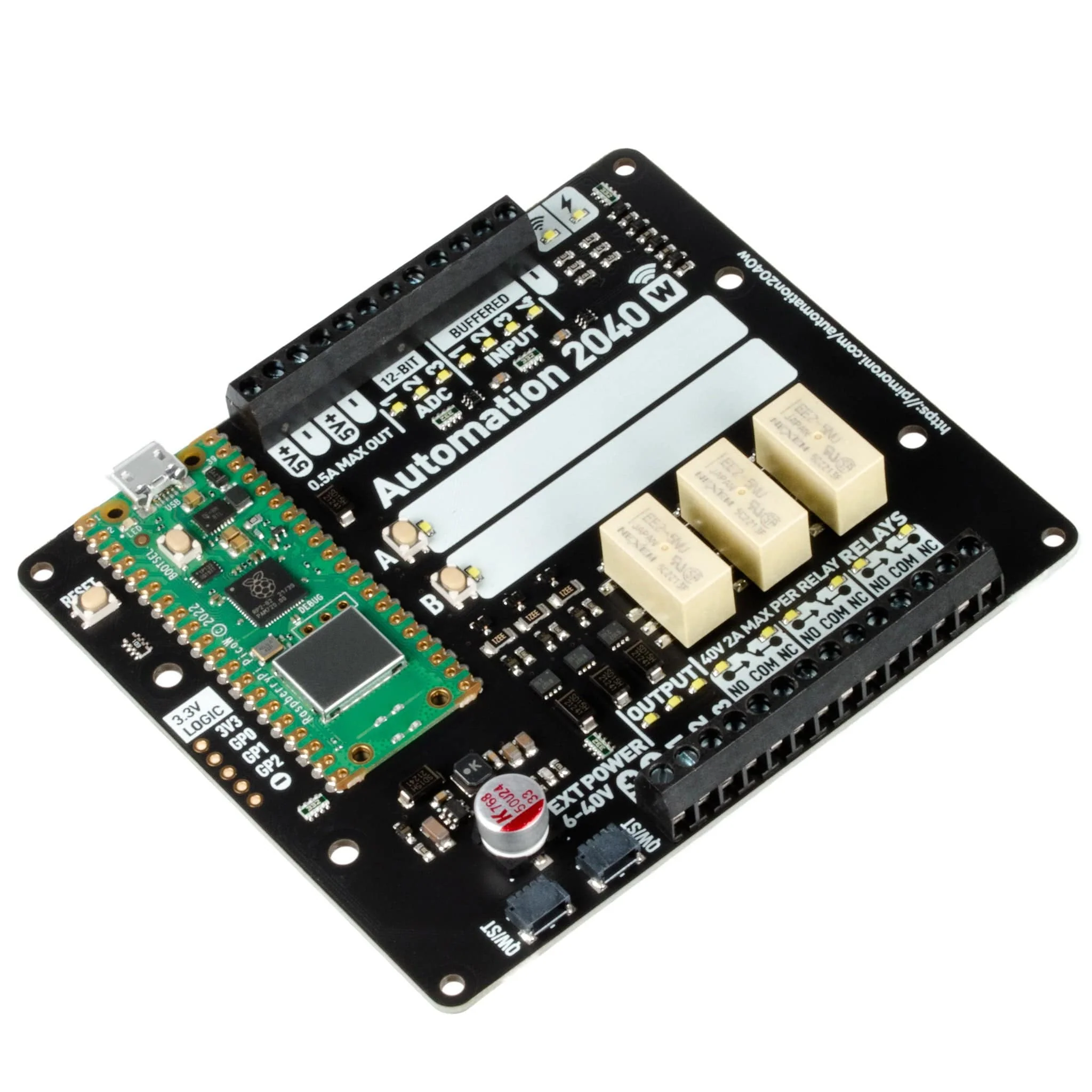
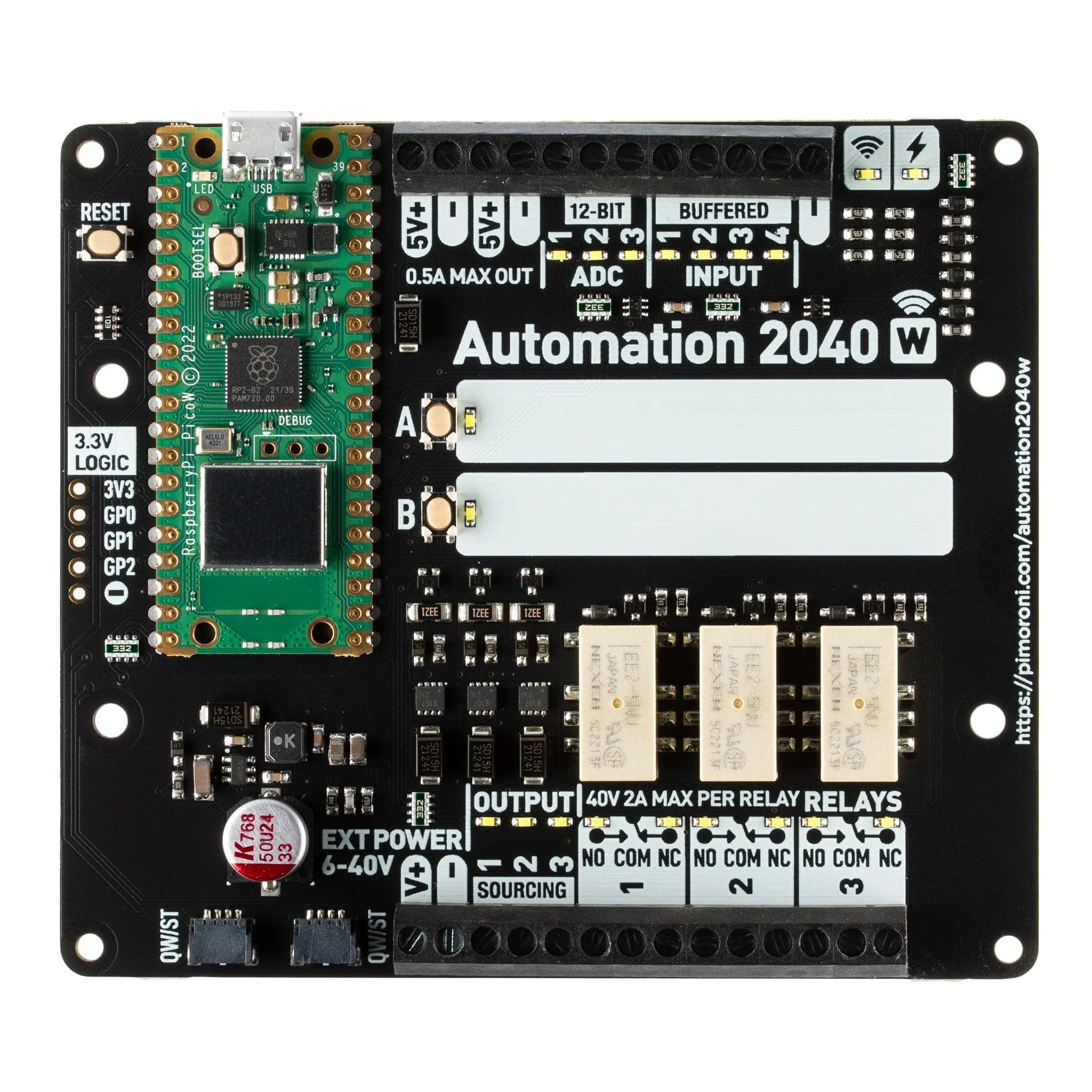
Automation 2040 W is a Pico W / RP2040 powered monitoring and automation board. It contains all the great features from our Automation HAT (relays, analog channels, powered outputs and buffered inputs) but now in a single compact board and with an extended voltage range so you can use it with more devices. Great for controlling fans, pumps, solenoids, chunky motors, electronic locks or static LED lighting (up to 40V).
All the channels (and the buttons) have an associated indicator LED so you can see at a glance what's happening with your setup, or test your programs without having hardware connected. We've even left some space for labelling whatever you've got connected up, be it piranha fish tanks, smart greenhouse sprinklers, elaborate homebrewing projects or Thunderbirds-esque garage door openers.
Want to mount this board inside a switch cabinet or other electrical enclosure? We have DIN rail mounting clips coming soon!
Features
- Raspberry Pi Pico W Aboard
- Dual Arm Cortex M0+ running at up to 133Mhz with 264kB of SRAM
- 2MB of QSPI flash supporting XiP
- Powered and programmable by USB micro-B
- 2.4GHz wireless
- 3 x 12-bit ADC inputs up to 40V
- 5 x digital inputs up to 40V
- 3 x digital sourcing outputs at V+ (supply voltage)
- 4A max continuous current
- 2A max current at 500Hz PWM
- 3 x relays (NC and NO terminals)
- 2A up to 24V
- 1A up to 40V
- 3.5mm screw terminals for connecting inputs, outputs and external power
- 2 x tactile buttons with LED indicators
- Reset button
- 2 x Qw/ST (Qwiic/STEMMA QT) connectors for attaching breakouts
- M2.5 mounting holes
- Fully assembled
- No soldering required.
- C/C++ and MicroPython libraries
- Schematic (coming soon)
Power
- Board is compatible with 12V, 24V and 36V systems
- Requires supply 6-40V
- Can provide 5V up to 0.5A for lower voltage applications
Software
Our C++/MicroPython libraries provide a straightforward way to interface with the functions on this board. You'll get the best performance using C++, but if you're a beginner we'd recommend using our batteries included MicroPython build for ease of getting started.
- Download pirate-brand MicroPython
- Getting Started with Raspberry Pi Pico
- MicroPython examples
- MicroPython function reference
- C++ examples
- C++ function reference
- Getting Started with Automation 2040 W
Connecting Breakouts
The Qw/ST connectors on Automation 2040 W make it super easy to connect up I2C Qwiic or STEMMA QT breakouts. If your breakout has a QW/ST connector on board, you can plug it straight in with a JST-SH to JST-SH cable.
Breakout Garden breakouts that don't have a Qw/ST connector can be connected using a JST-SH to JST-SH cable plus a Qw/ST to Breakout Garden adaptor. Want to use multiple breakouts at the same time? Try this adaptor!
- List of breakouts currently compatible with our C++/MicroPython build.
Notes
- Do not use to switch mains voltages!
About Pico W Aboard
Our new Pico W Aboard products come with a built-in Raspberry Pi Pico W. This means you get all the advantages of an RP2040 microcontroller - a speedy fast dual-core ARM processor, a dynamic, growing ecosystem and a choice of different programming methods to experiment with. Most excitingly though, Pico W has wireless connectivity, so your Pico/RP2040 devices can communicate with each other, and the internet!
Wireless is very new to Pico/RP2040 - be aware that things will move fast and change! Software support (wireless examples, tutorials, CircuitPython support etc) will take a little while to catch up. If you're an absolute beginner to Pico/RP2040, you might have a better experience with wireless if you wait until everything is a little more settled.
Original: $39.84
-70%$39.84
$11.95Product Information
Product Information
Shipping & Returns
Shipping & Returns
Description
An all-in-one, Pico W powered industrial/automation controller with 2.4GHz wireless connectivity, relays and a plethora of inputs and outputs. Compatible with 6V to 40V systems. Raspberry Pi Pico W built-in!
Automation 2040 W is a Pico W / RP2040 powered monitoring and automation board. It contains all the great features from our Automation HAT (relays, analog channels, powered outputs and buffered inputs) but now in a single compact board and with an extended voltage range so you can use it with more devices. Great for controlling fans, pumps, solenoids, chunky motors, electronic locks or static LED lighting (up to 40V).
All the channels (and the buttons) have an associated indicator LED so you can see at a glance what's happening with your setup, or test your programs without having hardware connected. We've even left some space for labelling whatever you've got connected up, be it piranha fish tanks, smart greenhouse sprinklers, elaborate homebrewing projects or Thunderbirds-esque garage door openers.
Want to mount this board inside a switch cabinet or other electrical enclosure? We have DIN rail mounting clips coming soon!
Features
- Raspberry Pi Pico W Aboard
- Dual Arm Cortex M0+ running at up to 133Mhz with 264kB of SRAM
- 2MB of QSPI flash supporting XiP
- Powered and programmable by USB micro-B
- 2.4GHz wireless
- 3 x 12-bit ADC inputs up to 40V
- 5 x digital inputs up to 40V
- 3 x digital sourcing outputs at V+ (supply voltage)
- 4A max continuous current
- 2A max current at 500Hz PWM
- 3 x relays (NC and NO terminals)
- 2A up to 24V
- 1A up to 40V
- 3.5mm screw terminals for connecting inputs, outputs and external power
- 2 x tactile buttons with LED indicators
- Reset button
- 2 x Qw/ST (Qwiic/STEMMA QT) connectors for attaching breakouts
- M2.5 mounting holes
- Fully assembled
- No soldering required.
- C/C++ and MicroPython libraries
- Schematic (coming soon)
Power
- Board is compatible with 12V, 24V and 36V systems
- Requires supply 6-40V
- Can provide 5V up to 0.5A for lower voltage applications
Software
Our C++/MicroPython libraries provide a straightforward way to interface with the functions on this board. You'll get the best performance using C++, but if you're a beginner we'd recommend using our batteries included MicroPython build for ease of getting started.
- Download pirate-brand MicroPython
- Getting Started with Raspberry Pi Pico
- MicroPython examples
- MicroPython function reference
- C++ examples
- C++ function reference
- Getting Started with Automation 2040 W
Connecting Breakouts
The Qw/ST connectors on Automation 2040 W make it super easy to connect up I2C Qwiic or STEMMA QT breakouts. If your breakout has a QW/ST connector on board, you can plug it straight in with a JST-SH to JST-SH cable.
Breakout Garden breakouts that don't have a Qw/ST connector can be connected using a JST-SH to JST-SH cable plus a Qw/ST to Breakout Garden adaptor. Want to use multiple breakouts at the same time? Try this adaptor!
- List of breakouts currently compatible with our C++/MicroPython build.
Notes
- Do not use to switch mains voltages!
About Pico W Aboard
Our new Pico W Aboard products come with a built-in Raspberry Pi Pico W. This means you get all the advantages of an RP2040 microcontroller - a speedy fast dual-core ARM processor, a dynamic, growing ecosystem and a choice of different programming methods to experiment with. Most excitingly though, Pico W has wireless connectivity, so your Pico/RP2040 devices can communicate with each other, and the internet!
Wireless is very new to Pico/RP2040 - be aware that things will move fast and change! Software support (wireless examples, tutorials, CircuitPython support etc) will take a little while to catch up. If you're an absolute beginner to Pico/RP2040, you might have a better experience with wireless if you wait until everything is a little more settled.